AI in Professional Training: Frequently Asked Questions


Artificial intelligence is reshaping professional training: task automation, personalized learning paths, real-time pedagogical analytics. But it also raises critical questions about GDPR compliance, algorithmic bias, and the right balance between human and machine. This FAQ answers the most common questions training professionals have about AI.
This article also explores the challenges (ethics, bias reduction, human-machine balance) and practical ways to integrate AI into pedagogical practices.
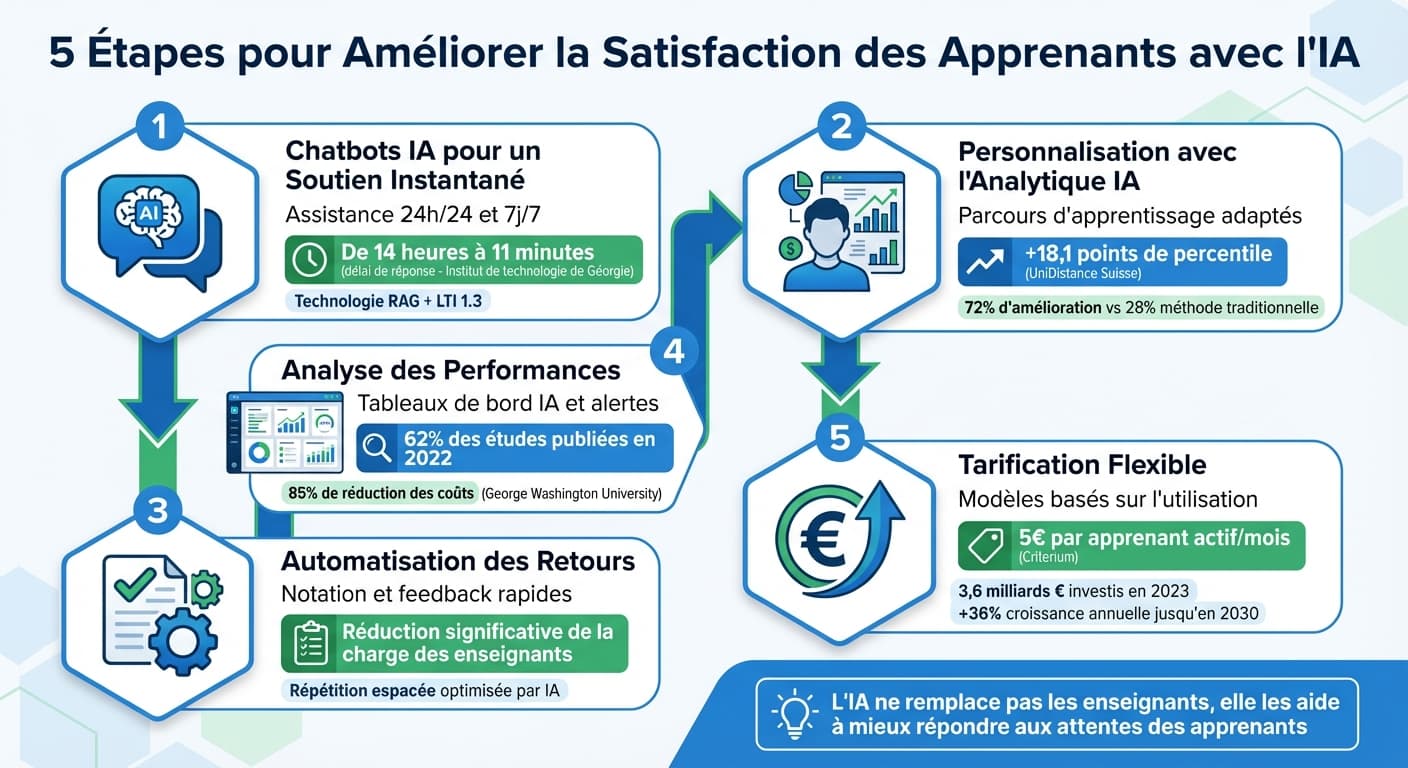
Related Guides
What Is AI in Professional Training?
Artificial intelligence in professional training refers to the use of machine learning algorithms, natural language processing (NLP), and data analytics to improve learning outcomes, automate administrative tasks, and personalize the learner experience.
Unlike traditional e-learning that delivers the same content to everyone, AI-powered training adapts in real time to each learner's pace, knowledge level, and preferences. From intelligent chatbots that answer questions 24/7 to adaptive learning engines that adjust difficulty on the fly, AI is transforming how organizations deliver training.
How Does AI Automate Training Tasks?
One of the most immediate benefits of AI in professional training is automating repetitive, time-consuming tasks that drain instructor and administrative resources.
Tasks AI Can Automate
Answering repetitive questions
AI chatbots handle up to 80% of routine inquiries: deadlines, enrollment, technical access.
Grading and assessment
Automated evaluation of quizzes, assignments, and even open-ended responses with NLP.
Content generation and curation
AI assists in creating quiz questions, summaries, and supplementary materials from existing content.
Progress tracking and reporting
Automated dashboards that aggregate learner progress, completion rates, and engagement metrics.
Concrete Example
A training center with 500 learners receives an average of 200 support emails per week. After deploying an AI chatbot trained on their course content, 70% of these questions are answered instantly, freeing the equivalent of one full-time support person.
How Does AI Personalize Learning Paths?
Personalization is where AI truly shines in professional training. Instead of a one-size-fits-all approach, AI enables adaptive learning paths that adjust to each learner's needs in real time.
Key Personalization Mechanisms
- Adaptive difficulty — AI adjusts question complexity based on learner performance, keeping engagement optimal
- Knowledge gap detection — algorithms identify weak areas and recommend targeted remediation content
- Spaced repetition — AI schedules review sessions at optimal intervals to maximize retention
- Learning style adaptation — content format (video, text, interactive) adjusts to individual preferences
- Pace adjustment — fast learners skip mastered material while struggling learners get extra support
“Personalized learning paths powered by AI can improve knowledge retention by up to 30% compared to traditional linear courses.”
What Pedagogical Data Does AI Provide?
AI doesn't just deliver training — it generates actionable pedagogical insights that help instructors and training managers make data-driven decisions.
- • Individual progress and completion rates
- • Time spent per module and engagement patterns
- • Knowledge gaps and common misconceptions
- • Predicted outcomes and at-risk learner identification
- • Most/least effective modules and materials
- • Drop-off points in learning sequences
- • Question difficulty calibration
- • Content relevance scoring based on learner interactions
These analytics enable a continuous improvement loop: instructors identify what works, fix what doesn't, and progressively optimize the learning experience. AI chatbot platforms like Criterium provide conversation analytics that reveal exactly which topics learners struggle with most.
AI and GDPR: What Are the Rules?
Using AI in training means processing personal data — learner names, progress, interaction patterns, and sometimes sensitive information. In Europe, the General Data Protection Regulation (GDPR) sets strict rules that training organizations must follow.
Key GDPR Requirements for AI in Training
Lawful basis for processing
You need a valid legal basis (consent, legitimate interest, or contractual necessity) to process learner data with AI.
Data minimization
Only collect data that is strictly necessary for the training purpose. Avoid storing conversation logs longer than needed.
Transparency
Inform learners that AI is being used, what data is collected, and how it is processed. No hidden profiling.
Right to explanation
Learners can request an explanation of automated decisions that affect them (e.g., adaptive path recommendations).
Data hosting in the EU
Choose AI solutions that host data within the European Union to ensure GDPR compliance.
Data Processing Agreement (DPA)
Sign a DPA with your AI vendor that defines responsibilities, data retention, and breach notification procedures.
Criterium's GDPR Approach
Criterium is designed with GDPR compliance at its core: EU-hosted data, minimal data collection, transparent AI usage, and a comprehensive DPA for all customers.
How to Address Algorithmic Bias?
AI systems can inherit and amplify biases present in their training data. In professional training, this can lead to unfair outcomes: certain learner profiles being systematically disadvantaged, biased content recommendations, or inaccurate assessments.
Best Practices for Reducing Bias
- Diverse training data — ensure AI models are trained on representative datasets that reflect your learner population
- Regular auditing — periodically review AI outputs for patterns of bias across demographics, learning styles, and backgrounds
- Human oversight — keep instructors in the loop for critical decisions; AI should augment, not replace, human judgment
- Transparency — document how AI decisions are made and make this information accessible to learners and stakeholders
- Feedback mechanisms — allow learners to report inaccurate or unfair AI responses and use this feedback to improve the system
The Human-Machine Balance
The goal is not to replace instructors with AI, but to create a complementary system where AI handles repetitive tasks and data processing while humans focus on mentoring, complex explanations, and emotional support. The most effective training programs use AI as a tool that empowers instructors rather than replacing them.
How to Integrate AI into Your LMS?
Integrating AI into an existing LMS (Learning Management System) is more accessible than ever, thanks to standardized protocols like LTI (Learning Tools Interoperability).
Integration Methods
| Method | Complexity | Best For | Example |
|---|---|---|---|
| LTI 1.3 | Low | Moodle, Canvas, Blackboard | Criterium, external AI tools |
| JavaScript widget | Low | Any web-based LMS | Chatbot overlays |
| Native plugin | Medium | Moodle (open-source) | Moodle AI blocks |
| REST API | High | Custom / enterprise LMS | Custom integrations |
Best Practices for Integration
- Start small — pilot with one course or department before scaling organization-wide
- Choose LTI 1.3 — it's the industry standard for secure, interoperable LMS integrations
- Train your instructors — ensure your team understands how to use AI tools effectively
- Measure impact — define KPIs before deployment and track them consistently
Integrating an AI Chatbot in Moodle or Canvas
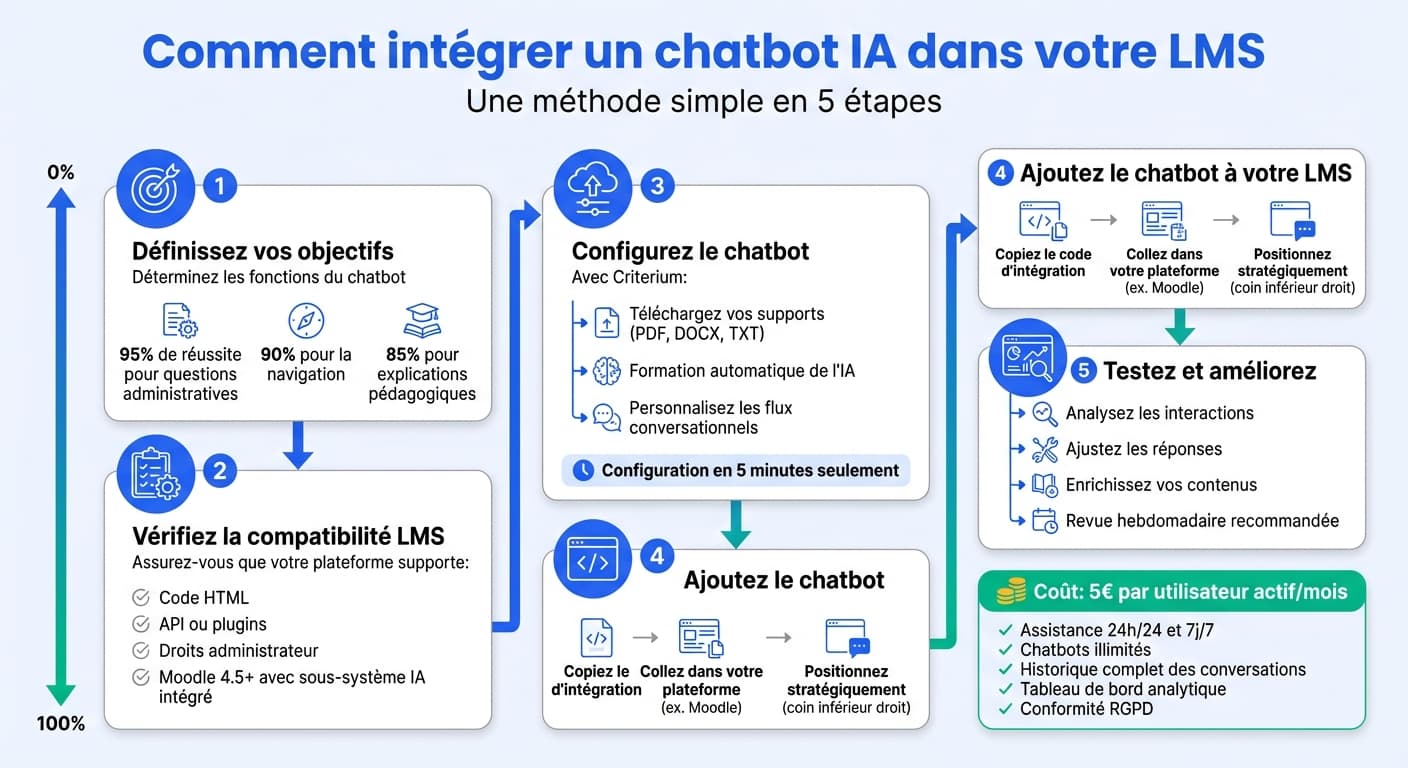
Moodle and Canvas are the two most popular LMS platforms for professional training. Both support AI chatbot integration, but with different approaches:
- • Open-source with full customization
- • LTI 1.3 support (Moodle 4+)
- • Native AI plugins available
- • Self-hosted for maximum GDPR control
- • Requires more technical setup
- • Cloud-managed, easy administration
- • Excellent LTI 1.3 support
- • App marketplace for AI tools
- • Built-in analytics capabilities
- • Less customization flexibility
With Criterium, integration with both platforms takes under 30 minutes via LTI 1.3. The chatbot then provides learners with instant, contextual answers based on your course content, available 24/7 directly within the LMS interface.
Frequently Asked Questions
Can AI completely replace trainers?
No. AI excels at automating repetitive tasks, providing instant answers, and personalizing content. But human instructors remain essential for mentoring, complex problem-solving, emotional support, and the kind of nuanced judgment that AI cannot replicate. The best approach is a complementary model where AI handles the routine while humans focus on high-value interactions.
Is AI in training GDPR-compliant?
It can be, but compliance depends on the solution you choose. Key requirements: EU data hosting, data minimization, learner consent, transparency about AI usage, and a signed Data Processing Agreement. Always verify that your AI provider meets these standards before deployment.
How much does AI integration cost for a training center?
Costs vary widely. Generic chatbot solutions (Intercom, Zendesk) start at €50-100/month. Purpose-built training AI platforms like Criterium offer pricing at €5 per active learner/month, making them far more cost-effective for education. Many organizations see positive ROI within 3 months thanks to reduced support costs and improved completion rates.
What types of content can AI chatbots be trained on?
Modern AI chatbots using RAG (Retrieval-Augmented Generation) can ingest PDFs, Word documents, presentations, web pages, FAQ documents, and video transcripts. The key is to provide well-structured content that covers the topics learners are likely to ask about.
How do I measure the ROI of AI in training?
Track these key metrics: support ticket reduction (typically 50-70%), learner satisfaction scores, course completion rates, time-to-competency, and instructor time savings. Compare these against the cost of the AI solution to calculate your return on investment.
Can AI work with my existing LMS?
Yes. Most modern AI solutions integrate via LTI 1.3, which is supported by Moodle, Canvas, Blackboard, and most enterprise LMS platforms. For platforms without LTI, alternatives include JavaScript widgets and simple link-based access.
Ready to bring AI to your training programs?
Criterium integrates with your LMS in under 30 minutes. Start with a free trial and discover how AI-powered learner support transforms your training organization.
Ready to add AI to your LMS?
Create a free account and have your AI assistant running in 5 minutes.
Get started free