Moodle vs Canvas: Which LMS for Your AI Chatbot?


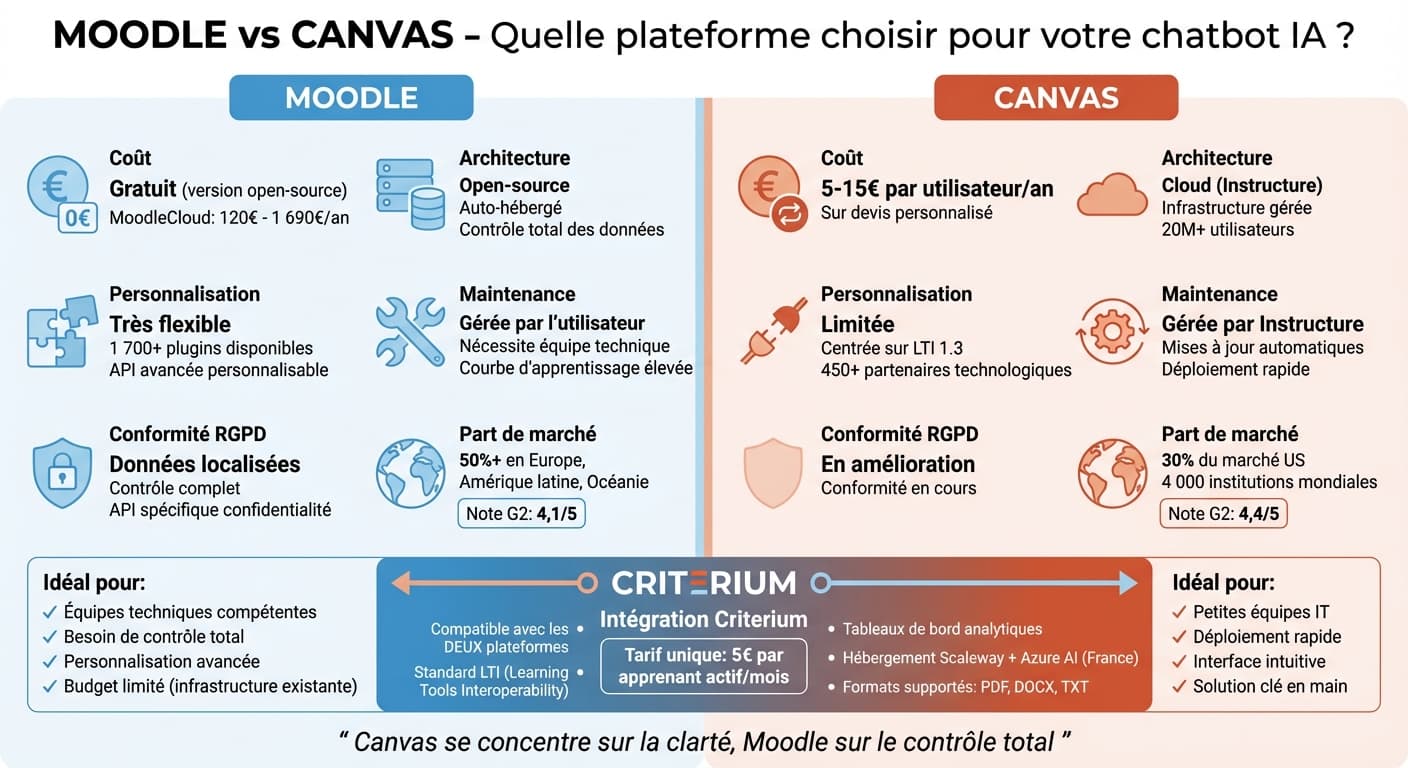
Choosing between Moodle and Canvas for your AI chatbot integration is not just a technical decision — it shapes your costs, customization options, maintenance burden, and GDPR compliance strategy. This guide compares both platforms head-to-head so you can make the right choice for your training organization.
Related Guides
1. Moodle vs Canvas: Platform Overview
Two Philosophies, One Goal
Moodle is an open-source LMS used by over 400 million users worldwide. Self-hosted by default, it gives organizations full control over their infrastructure, data, and customization. Its plugin ecosystem includes more than 2,000 community-built extensions.
Canvas by Instructure is a cloud-native SaaS LMS adopted by thousands of institutions and enterprises. Its strength lies in a polished user experience, native integrations, and a fully managed infrastructure that requires zero server administration.
- Open-source (GPL)
- Self-hosted or MoodleCloud
- 2,000+ plugins available
- 400M+ users worldwide
- Proprietary SaaS
- Fully cloud-managed
- Native API-first design
- Used by 6,000+ institutions
2. AI Chatbot Integration Methods
LTI: The Universal Standard
Both Moodle and Canvas support LTI (Learning Tools Interoperability), the industry standard for connecting external tools to an LMS. LTI 1.3, the latest version, provides secure OAuth 2.0 authentication and deep linking capabilities.
With LTI, an AI chatbot like Criterium can be embedded directly into course pages on both platforms, appearing as a native tool to learners. The setup process differs slightly between the two.
Moodle: Plugins + LTI
Moodle offers two integration paths: native plugins installed directly on the server, and LTI external tools. Native plugins provide deeper integration (access to Moodle's internal APIs, database, events), but require server-level access and PHP knowledge for maintenance.
LTI on Moodle is configured through Site Administration > Plugins > External Tool. Once set up, the chatbot appears as an activity within courses, with full grade passback and user identity support.
Canvas: LTI + REST API
Canvas excels at LTI integrations thanks to its API-first architecture. Adding an LTI 1.3 tool takes just a few clicks in the admin panel. Canvas also offers a comprehensive REST API that allows chatbots to programmatically access courses, assignments, grades, and user data.
Unlike Moodle, Canvas does not support native server-side plugins. All integrations go through LTI or the REST API, which simplifies architecture but limits deep customization.
Key Takeaway
Moodle offers more integration options (plugins + LTI), while Canvas provides a smoother LTI experience out of the box. For AI chatbots using LTI 1.3, both platforms work equally well.
3. Customization and Flexibility
Moodle: Maximum Control
Being open-source, Moodle allows unlimited customization. Organizations can modify the core code, build custom plugins, design unique themes, and tailor every aspect of the learning experience. For AI chatbot integration, this means:
- Custom chatbot widgets embedded anywhere in the interface
- Direct database access for advanced analytics
- Custom event handlers to trigger chatbot actions
- Full control over data flow and storage
Canvas: Guided Flexibility
Canvas offers customization within a defined framework. The platform provides a JavaScript/CSS injection feature for visual customization and a powerful API for data integration. However, you cannot modify the core platform or install server-side code.
- Theme customization via sub-accounts
- LTI placements for tool positioning
- REST API for data-driven integrations
- No access to underlying infrastructure
4. Cost Comparison
Moodle: Low License, Higher Operations
Moodle itself is free to download and use. However, self-hosting requires server infrastructure, system administration, security patching, and regular updates. For organizations without in-house IT teams, managed hosting providers (MoodleCloud, Titus Learning, etc.) charge between €500 and €5,000/year depending on scale.
Canvas: Predictable SaaS Pricing
Canvas uses a per-user annual subscription model. Pricing is not publicly listed, but institutions typically pay between $5–$15 per user per year. This includes hosting, updates, support, and a 99.9% uptime SLA. There are no hidden infrastructure costs.
Criterium Works With Both
Regardless of your LMS choice, Criterium integrates via LTI 1.3 at €5 per active learner per month. No separate infrastructure needed — the chatbot cost stays the same on Moodle or Canvas.
5. Maintenance and Operations
Moodle: You Own the Stack
Self-hosted Moodle requires active maintenance: server updates, PHP version upgrades, database optimization, security patches, and plugin compatibility checks after each Moodle release. Major version upgrades (e.g., Moodle 4.x to 5.x) can take days of testing and migration work.
For AI chatbot plugins installed natively, each Moodle update may require plugin updates too. Plugin compatibility issues after upgrades are a common pain point reported by administrators.
Canvas: Fully Managed
Canvas handles all infrastructure maintenance. Updates are deployed automatically every three weeks, with no downtime and no action required from administrators. LTI integrations are unaffected by platform updates since they use standardized protocols.
"With LTI-based integrations, the chatbot runs independently of LMS updates. Whether you're on Moodle or Canvas, an LTI chatbot requires zero maintenance when the LMS is upgraded."
6. GDPR Compliance
Moodle: Full Data Sovereignty
Self-hosted Moodle gives organizations complete control over data location. You choose where servers are hosted, how data is encrypted, and who has access. For EU-based training centers, this means data can stay entirely within the EU, simplifying GDPR compliance.
Moodle also includes built-in GDPR tools: data export requests, right to erasure, consent management, and data retention policies configurable per category.
Canvas: Cloud Compliance
Canvas stores data on AWS infrastructure. For European customers,Instructure offers EU-hosted instances. However, being a US-based company, data processing involves transatlantic considerations under GDPR. Instructure provides a Data Processing Agreement (DPA) and is certified under various privacy frameworks.
- Full data sovereignty (self-hosted)
- Built-in GDPR tools
- EU hosting guaranteed
- No third-party data processing
- EU-hosted instances available
- DPA provided by Instructure
- AWS infrastructure
- US-based data processor
Criterium's GDPR Approach
Criterium is hosted entirely within the EU with complete tenant isolation. Regardless of whether you use Moodle or Canvas, learner data processed by the chatbot stays in Europe with full GDPR compliance.
7. Decision Matrix: Which One to Choose?
Choose Moodle If...
- You need maximum customization and full control over your infrastructure
- You have an in-house IT team capable of managing servers and updates
- Data sovereignty is non-negotiable and you want to self-host in the EU
- You want to leverage the open-source plugin ecosystem for deep chatbot integration
- Budget is tight and you prefer zero license fees over convenience
Choose Canvas If...
- You want a fully managed platform with no server administration
- Your priority is a modern, intuitive UX for both admins and learners
- You prefer predictable costs with an all-inclusive subscription
- You need rapid deployment without infrastructure setup
- LTI and API integrations are sufficient for your chatbot needs
| Criteria | Moodle | Canvas |
|---|---|---|
| Customization | ★★★ | ★★ |
| Ease of setup | ★★ | ★★★ |
| Maintenance burden | High (self-managed) | Low (fully managed) |
| License cost | Free (open-source) | Paid subscription |
| Total cost of ownership | Variable (hosting + ops) | Predictable (SaaS) |
| GDPR (data sovereignty) | Full control | EU instances available |
| LTI 1.3 support | ✓ | ✓ |
| AI chatbot integration | ✓ | ✓ |
Conclusion
There is no universally "better" platform. Moodle is ideal for organizations that need deep customization, full data sovereignty, and are willing to invest in technical maintenance. Canvas is the right choice for teams that prioritize ease of use, managed infrastructure, and predictable costs.
The good news for AI chatbot integration: both platforms fully support LTI 1.3, meaning you can deploy an AI assistant like Criterium on either platform with the same setup process and the same learner experience.
Whichever LMS you choose, the key is to pick a chatbot solution that is LMS-agnostic, GDPR-compliant, and designed specifically for training organizations — not a generic customer support tool repurposed for education.
Frequently Asked Questions
Can I use the same AI chatbot on both Moodle and Canvas?
Yes, if the chatbot supports LTI 1.3. Solutions like Criterium use LTI as the integration standard, making them compatible with any LMS that supports this protocol. You can even run the same chatbot across both platforms simultaneously.
Which platform is easier to set up an AI chatbot on?
Canvas generally offers a faster setup thanks to its streamlined LTI configuration interface. On Moodle, the process requires a few more steps in the admin panel, but both can be completed in under 30 minutes for LTI-based chatbots.
Is Moodle more GDPR-compliant than Canvas?
Self-hosted Moodle gives you full control over data location, making GDPR compliance simpler for EU organizations. Canvas offers EU-hosted instances and DPAs, but as a US-based company, some organizations may have additional compliance considerations.
Can I migrate my chatbot from Moodle to Canvas (or vice versa)?
With LTI-based chatbots, migration is straightforward since the chatbot runs independently of the LMS. You simply configure the LTI connection on the new platform. Your chatbot's knowledge base, settings, and conversation history remain intact.
Ready to add AI to your LMS?
Criterium integrates with both Moodle and Canvas via LTI 1.3 in under 30 minutes. Start with a free trial and see the difference an AI chatbot makes.
Ready to add AI to your LMS?
Create a free account and have your AI assistant running in 5 minutes.
Get started free