Improving Learner Satisfaction with AI


Artificial intelligence (AI) is transforming learning by providing concrete solutions to meet the needs of learners and trainers. Here are the key takeaways:
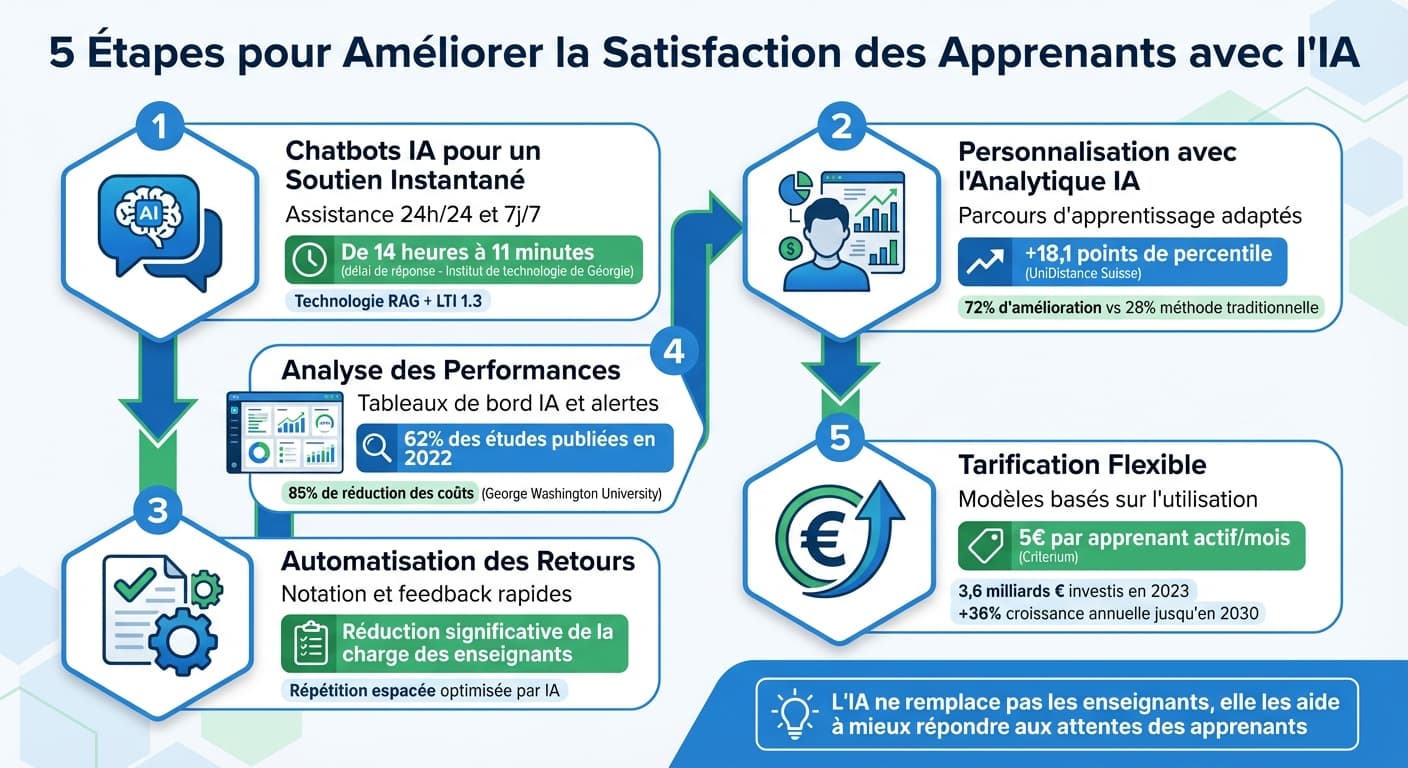
- Instant support: AI chatbots available 24/7 reduce assistance delays (e.g. from 14 hours to 11 minutes at the Georgia Institute of Technology).
- Personalized learning paths: AI analyzes learner data to deliver content tailored to their specific needs (e.g. +18.1 percentile points for AI tutor users at UniDistance Switzerland).
- Automated feedback: AI tools grade assignments quickly, lightening the teacher's workload while improving accuracy.
- Performance analytics: AI dashboards identify struggling learners and optimize educational content.
- Flexible pricing models: Solutions like Criterium charge only for active users (€5 per active learner/month), making AI accessible to all.
AI doesn't replace teachers but helps them better meet learner expectations while optimizing educational processes. With easy-to-integrate tools and measurable benefits, it redefines the learning experience.
Webinar: AI for Learner Support
Related Guides
Step 1: Set Up AI Chatbots for Instant Learner Support
AI chatbots transform the learning experience by providing immediate assistance, improving student engagement while reducing frustration. With Criterium's integration into your LMS platform (like Moodle, Canvas, or Blackboard), the LTI 1.3 standard ensures a secure connection between the chatbot and your system. For example, on Moodle, you simply insert the script via Administration > Appearance > Additional HTML for a quick setup.
Once installed, the chatbot delivers precise answers thanks to RAG (Retrieval-Augmented Generation) technology. Unlike standard chatbots that pull responses from internet sources, this system relies solely on your specific content (PDFs, syllabi, FAQs, URLs). To avoid off-context or incorrect responses ("hallucinations"), you can set the temperature to 0, forcing the bot to extract only information directly from your documents.
24/7 Availability
AI chatbots are always available, which is crucial for students who often work late on exams or assignments. A concrete example comes from Oklahoma City Community College, where a student reported:
I was taking an exam last night, and I got disconnected... the chatbot on Moodle's homepage saved my life since it was already late and I needed immediate assistance.
Customize Branding and Tone
Beyond its effectiveness, the chatbot should reflect your institution's values and identity. You can customize the tone of responses and adjust the language by creating personas and guardrails using specific prompts. As Matt Porritt, Product Director at Moodle HQ, emphasizes:
A human-centered approach to AI is at the heart of our AI principles. That's why the subsystem allows organizations to have full control over how AI is used on their Moodle site.
Step 2: Personalize Learning with AI Analytics
After implementing instant assistance via chatbots, the next step is to refine the learning experience through AI analytics. This technology transforms raw data into personalized pathways by identifying each learner's specific challenges and adapting content accordingly. Current systems leverage various data points such as quiz results, time spent on each module, and navigation patterns.
Analyze Learner Data to Identify Gaps
AI analytics tools use predictive algorithms to segment learners and anticipate their performance. For example, in June 2023, researchers from ENSET in Morocco integrated an AI chatbot solution into Moodle for 71 engineering students. After a pre-test highlighted unmastered concepts in C programming, the chatbot proposed targeted recommendations. The results were impressive: the proportion of students classified as "advanced beginner" went from 3% to 51%, while the "weak beginner" level was completely eliminated in just two weeks.
This knowledge-level approach proved its effectiveness against traditional methods. A comparative study showed it improves learning outcomes for 72% of participants, compared to 28% for a learning-styles-based method. Additionally, Natural Language Processing (NLP) analyzes student questions through Bloom's taxonomy, enabling assessment of their cognitive comprehension depth.
Adaptive Feedback and Personalized Learning Paths
Once gaps are identified, AI offers tailored learning paths adjusted in real time. A notable example comes from UniDistance Switzerland, where psychology students used an AI tutoring app for a neuroscience course during the 2022–2023 academic year. Using GPT-3, the system generated 800 microlearning questions and used a neural network to predict "mastery" of each concept. Active students saw their exam rankings improve by 15 percentile points compared to a control group without an AI tutor. Those who answered more than 1,000 questions benefited from an additional gain of 18.1 percentile points.
Desirable difficulty depends on individual abilities, preferences, and energy levels, highlighting the importance of personalized learning to improve the overall learning experience.
— Ambroise Baillifard, Researcher at UniDistance Switzerland
Step 3: Automate Fast and Accurate Feedback
After personalizing learning paths, the next step is to automate feedback to maintain learner engagement. Using advanced language models and grading rubrics, AI systems can examine student responses and provide precise comments in real time.
Automate Grading and Feedback
In February 2025, EDHEC Business School tested a pilot program in which first-year Grande École midterm exams were pre-graded by an AI tool. This project, led by Professors Emmanuelle Deglaire and Peter Daly in collaboration with PiLab, used AI to identify key points and evaluate papers. This "augmented professor" approach delivered faster feedback while leaving final grade responsibility to teachers. As Emmanuelle Deglaire explains:
The future probably doesn't lie in delegating the grading task to an AI tool, but in learning to work with it to become an "augmented professor," capable of working hand in hand with AI.
Improve Retention with Spaced Repetition
AI optimizes spaced repetition techniques by tracking each student's performance and automatically scheduling targeted reviews for the most challenging concepts. For example, systems like ZPDES use sophisticated algorithms to adjust exercises, keeping students in their optimal zone of development. AI dashboards also allow trainers to quickly spot signs of disengagement or declining performance, generating personalized alerts and reminders to prevent dropout and improve completion rates.
Step 4: Analyze Performance and Improve Content with AI
Once automated feedback is in place, regularly analyzing data to refine your training becomes crucial. AI-powered dashboards centralize information from your LMS, forums, and virtual assistants, providing a comprehensive view of learner behavior and areas for improvement. Modern tools go beyond simple descriptive statistics by offering predictive and prescriptive analytics that suggest concrete actions to boost engagement.
Track Key Engagement Metrics
AI-powered dashboards track essential metrics: login frequency, time spent on each module, quiz participation rates, and interactions with learning resources. Some advanced systems use Natural Language Processing to analyze emotions expressed in chatbot conversations, such as stress, curiosity, or confusion. Machine learning models identify "at-risk" learners by detecting early warning signs, such as declining activity or falling scores. In professional training, a 70% threshold is often used to assess failure risk.
Refine Content Based on Learner Data
Using this data, institutions can adjust and improve their educational materials in real time. Analysis reveals trends that guide continuous content improvement. For example, if AI detects that learners spend too long on a specific quiz question, it may indicate a need to clarify the corresponding content. At George Washington University, an AI mentor helped identify recurring questions and quickly adapt materials, reducing costs by 85%.
What sets our approach apart is the emphasis on instructional design and cost-effectiveness.
— Prof. Lorena A. Barba, George Washington University
Step 5: Scale Training with Affordable AI Pricing
Once your content is optimized and performance analyzed, it's time to scale up while controlling costs. In 2023, global investments in educational AI reached €3.6 billion, with annual growth estimated at over 36% through 2030. AI tools can reduce course design time by a factor of 10, facilitating catalog expansion without significantly increasing costs.
Choose Flexible Pricing Models for Growth
"Active learner" pricing models are an effective solution for paying only for engaged users. For example, Criterium's Active Learner plan charges €5 per active learner per month, avoiding unnecessary costs for inactive accounts. This model is particularly useful in environments with fluctuating headcounts or limited resources. Organizations allocating at least 15% of their budget to training see 2.8x higher adoption rates.
Measure ROI for Lasting Success
Return on investment (ROI) goes beyond direct savings. It includes time saved, accelerated skill development, and reduced turnover through increased motivation. The ROI calculation is simple: (Net Training Benefits – Training Costs) / Training Costs. Successful programs typically achieve 80–90% completion rates, indicating high engagement and perceived value.
ROI is the ultimate metric that connects learning to business outcomes. It quantifies the economic impact of AI upskilling.
— AI CERTs®
Best Practices for AI Integration
Simplify Setup with No-Code Tools
No-code tools make AI integration more accessible. Platforms like Canvas or Moodle allow you to add AI features directly to your courses without programming skills. The RAG method automatically links responses to existing educational materials. Choose "LLM-agnostic" platforms that work with different AI models, avoiding vendor lock-in.
A notable example comes from George Washington University, where in 2024, Professor Lorena A. Barba supervised a pilot project using ibl.ai. The team uploaded lecture notes and readings to create a "contextual" assistant. Result: an 85% cost reduction compared to ChatGPT, while offering support aligned with the course's pedagogy and available 24/7.
Train Teams and Collect Feedback
Team training is an essential step with three phases: awareness, adjustment, and consolidation. "Fellowship" programs are particularly effective. For example, in spring 2025, Morehouse College launched the "AI-PiLOT Fellows" program involving five professors from various disciplines. These teachers developed personalized AI mentors in Canvas LMS, encouraging students to ask questions they might not dare to ask in class.
Use Metrics to Drive Improvements
Metrics play a key role in adjusting your AI strategy. Dashboards should include three types of indicators:
- Engagement: interaction frequency, time spent on materials, and number of usage days.
- Cognitive metrics: comprehension assessment via tools like Bloom's taxonomy and a "mastery score" predicting learner success probability.
- Affective indicators: qualitative data analysis to detect emotional signals such as stress, curiosity, or confusion.
Conclusion
Artificial intelligence is profoundly transforming how learners experience their educational journey. The five steps discussed — always-on chatbots, data-driven personalization, automated feedback, content refinement, and flexible pricing — provide a comprehensive framework for enriching the learning experience.
The results speak for themselves: George Washington University reduced its support costs by 85%, UniDistance Switzerland saw an average 15 percentile point increase in exam scores, and some institutions in Australia reduced planning and grading time by 30%.
To realize these benefits, Criterium offers an accessible solution combining personalization, automation, and analytics. Compatible with platforms like Moodle or Canvas, it lets you create unlimited chatbots powered directly by your educational materials. At a clear price of €5 per active learner per month, you only pay for engaged users while benefiting from a complete analytics dashboard.
The AI mentor was designed to serve the instructor's pedagogy, not to replace it.
— Prof. Lorena A. Barba
With instant support, tailored personalization, and continuous performance evaluation, you create an environment where every learner benefits from customized guidance. This proven approach improves not only academic outcomes but also learner confidence in digital tools.
FAQs
What data does AI use to personalize learning?
AI primarily uses learner data such as their interactions, performance, profiles, and engagement levels. This information is used to personalize content and learning experiences to better align with their specific needs.
How to prevent the chatbot from providing made-up answers?
To reduce risks of incorrect or invented responses, use techniques like Retrieval-Augmented Generation (RAG). This method combines a verified database with the model's ability to produce fluent, natural responses. Key practices include regularly evaluating prompts and responses, informing users when uncertain, continuously training the chatbot with accurate data, and performing regular quality checks.
Which metrics to track to prove AI ROI in training?
Track key indicators such as skill progression (pre/post test results), learner satisfaction (surveys and qualitative feedback), real-time engagement (AI tool usage during sessions), and organizational impact (cost reduction, resource optimization, improved overall performance).
Ready to improve learner satisfaction?
Criterium integrates with your LMS via LTI 1.3 in under 30 minutes. Start with a free trial and discover how AI transforms your learner support.
Ready to add AI to your LMS?
Create a free account and have your AI assistant running in 5 minutes.
Get started free