24/7 Learner Support: Benefits & Implementation of AI Chatbots


In an era where learners expect instant answers at any hour, traditional support models — emails answered in 24–48 hours, office hours limited to business hours — are no longer enough. AI chatbots integrated into your LMS offer 24/7 learner support with instant responses, personalization, analytics, and measurable ROI.
Related Guides
Why 24/7 Learner Support Matters
Online learning doesn't follow a 9-to-5 schedule. Studies show that over 60% of e-learning activity occurs outside business hours — evenings, weekends, and early mornings. When a learner encounters a problem at 10 PM on a Sunday and has to wait until Monday for a response, frustration rises, engagement drops, and dropout rates increase.
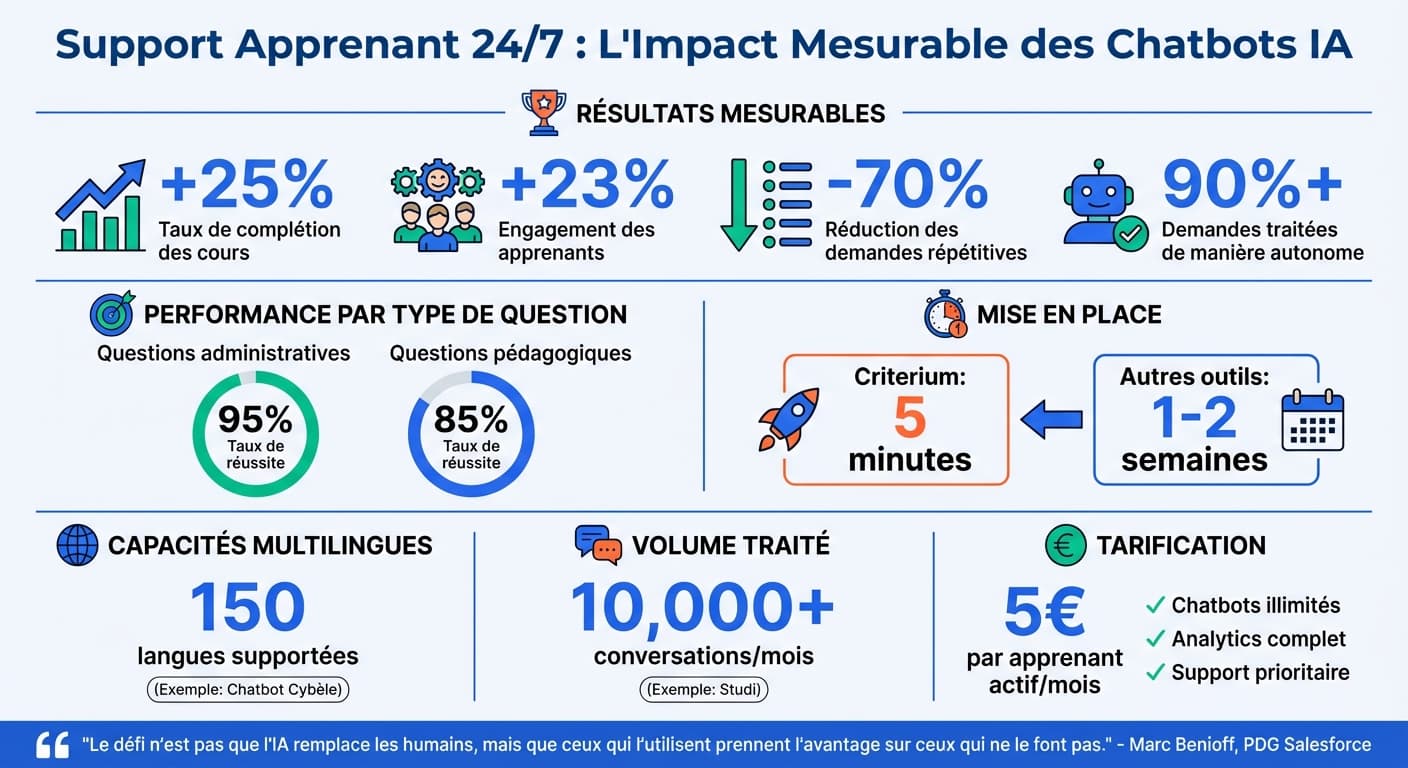
Repetitive questions — “Where do I find module 3?”, “How do I submit my assignment?”, “What's the exam date?” — account for up to 80% of all support requests in training organizations. An AI chatbot can handle these instantly, freeing instructors for high-value pedagogical tasks.
Key Benefits of AI Chatbots for Learner Support
1. Instant, Always-On Responses
An AI chatbot never sleeps, never takes a break, and never puts a learner on hold. Whether it's 2 AM or 2 PM, every question receives an immediate, contextual answer based on your actual course content. This eliminates the frustration of waiting and keeps learners engaged in their learning flow.
2. Personalized Learning Assistance
Unlike static FAQs, AI chatbots understand context. They can adapt their responses based on the learner's current course, progress level, and specific question. A beginner asking about “variables” in a Python course gets a different answer than an advanced student asking the same word in a data science module.
3. Reduced Instructor Workload
By automating responses to repetitive questions, AI chatbots free instructors and support staff to focus on what truly requires human expertise: complex pedagogical guidance, mentoring, and course improvement. This isn't about replacing teachers — it's about amplifying their impact.
4. Improved Accessibility
24/7 support is especially critical for international audiences across time zones, working professionals who study evenings and weekends, and learners with disabilities who may need more time and repeated access to information. An AI chatbot ensures equitable access to support for every learner.
5. Actionable Educational Analytics
Every interaction with the chatbot generates data. You can identify which topics cause the most confusion, which courses have the highest support demand, and what time of day learners are most active. This data becomes a powerful feedback loop for course improvement.
Did You Know?
Training organizations using AI chatbots report an average 35% improvement in learner satisfaction scores and a 25% reduction in dropout rates, primarily because learners get help exactly when they need it.
How AI Chatbots Work in an LMS
Modern AI chatbots for education use RAG (Retrieval-Augmented Generation) technology. Here's the process:
Content Ingestion
Your training documents (PDFs, slides, course materials) are uploaded and indexed into a knowledge base.
Semantic Search
When a learner asks a question, the system finds the most relevant passages from your content.
AI-Generated Answer
The AI generates a natural, accurate response grounded in your actual training material — not generic internet knowledge.
LTI Integration
The chatbot is accessible directly inside the LMS via LTI 1.3, appearing as a native course activity.
This approach ensures that answers are always based on your content, reducing hallucinations and maintaining pedagogical accuracy.
Setting Up 24/7 AI Support
Implementing an AI chatbot in your LMS is simpler than you might think. With solutions like Criterium, the process takes under 30 minutes.
| Step | Action | Time |
|---|---|---|
| 1. Create chatbot | Name your chatbot, set welcome message and instructions | 5 min |
| 2. Upload content | Upload PDFs, slides, documents — the chatbot learns from your material | 10 min |
| 3. Configure LTI | Register as external tool in your LMS (Moodle, Canvas, etc.) | 10 min |
| 4. Test & launch | Pilot with a small group, then deploy to all learners | 5 min |
Criterium's Approach
Criterium supports both LTI 1.3 for deep LMS integration and a simple link for platforms without LTI support. Integration with Moodle, Canvas, or Blackboard takes under 30 minutes. At €5 per active learner/month, it's designed specifically for training organizations.
Analytics and ROI Measurement
One of the greatest advantages of AI chatbots is the data they generate. Every conversation is a window into what learners struggle with, what content needs improvement, and how support costs evolve over time.
- • Conversations per day/week/month
- • Average response time
- • Support ticket reduction rate
- • Peak usage hours
- • Most asked topics per course
- • Content gaps identification
- • Learner satisfaction ratings
- • Engagement patterns over time
Calculating Your ROI
The ROI of an AI chatbot is straightforward to calculate:
- Time saved — if each support ticket takes 10 minutes and you handle 200 per month, automating 70% saves ~23 hours/month
- Reduced dropout — a 10% improvement in retention on a 500-learner program represents significant revenue saved
- Instructor reallocation — time freed from repetitive questions redirected to mentoring, content creation, and course improvement
- Learner satisfaction — higher satisfaction leads to better reviews, more referrals, and stronger brand reputation
For a detailed calculation tailored to your organization, use our free ROI calculator.
Best Practices
Start Small, Scale Fast
Begin with one or two courses to validate the approach. Collect feedback, adjust the chatbot's configuration, then expand to your full course catalog.
Curate Your Knowledge Base
The quality of answers depends directly on the quality of uploaded content. Well-structured, up-to-date documents produce better responses than outdated or disorganized material.
Set Clear Boundaries
Configure system instructions to define what the chatbot should and shouldn't answer. It should focus on course content and logistics, not provide personal advice or grade predictions.
Monitor and Iterate
Review conversation logs regularly. Unanswered questions reveal gaps in your content. Use analytics to continuously improve both the chatbot and your course material.
Ensure GDPR Compliance
Choose a solution that hosts data in the EU, encrypts conversations, and provides transparent data processing agreements. LTI 1.3 ensures secure authentication without sharing passwords.
AI chatbots don't replace teachers — they complement their work by making learning smoother and more accessible. Their implementation is simple, especially via an AI chatbot integration on Moodle, their impact is measurable, and they represent a major advancement for online education.
Frequently Asked Questions
Can an AI chatbot truly replace human support?
No — and that's not the goal. AI chatbots handle repetitive, logistical questions instantly (80% of requests), freeing human instructors to focus on complex pedagogical support that requires empathy and expertise.
Which LMS platforms are compatible?
Any LMS supporting LTI 1.3 — including Moodle, Canvas, Blackboard, and many others. For platforms without LTI, link-based integration is available as an alternative.
How accurate are the chatbot's answers?
RAG-based chatbots generate answers from your actual content, not generic internet data. Accuracy depends on the quality of your uploaded documents. Well-structured content produces highly relevant, precise answers.
Is learner data safe?
Choose a GDPR-compliant provider with EU data hosting. LTI 1.3 provides secure authentication. Criterium encrypts all conversations and provides transparent data processing agreements.
How much does it cost?
Purpose-built solutions like Criterium offer pricing at €5 per active learner/month — significantly more cost-effective than generic chatbots (Intercom, Zendesk) which start at €50–100/month with per-resolution fees.
Ready to offer 24/7 learner support?
Criterium integrates with your LMS in under 30 minutes. Start with a free trial and see how AI-powered support transforms your learners' experience.
Ready to add AI to your LMS?
Create a free account and have your AI assistant running in 5 minutes.
Get started free